How to Automate Dropshipping with Zapier: Save 2-3 Hours Daily (2026)
You spend 2-3 hours every day copying order details from Shopify into supplier portals, sending confirmation emails, and tracking shipments.
None of this makes you money. It’s data entry disguised as “managing your business.”
Zapier eliminates repetitive data transfer between your store, suppliers, and customers. It handles the mechanical tasks that consume time but require zero creativity. When an order comes in, Zapier moves the data where it needs to go.
Why Manual Processing Costs You 2-3 Hours Daily
Most dropshippers process 10-30 orders daily when starting out. Each order requires copying details, pasting to the supplier portal, sending emails, updating spreadsheets, and tracking.
At 5 minutes per order, 20 orders consume nearly 2 hours of pure data entry.
The cost isn’t just time — it’s errors. Manual copying introduces typos. Wrong zip codes delay shipments. Missed emails create support tickets. Growth stalls not because demand disappeared, but because operations collapsed under manual processes.
Above 30-40 daily orders, automation becomes mandatory for scaling.
What Zapier Actually Does
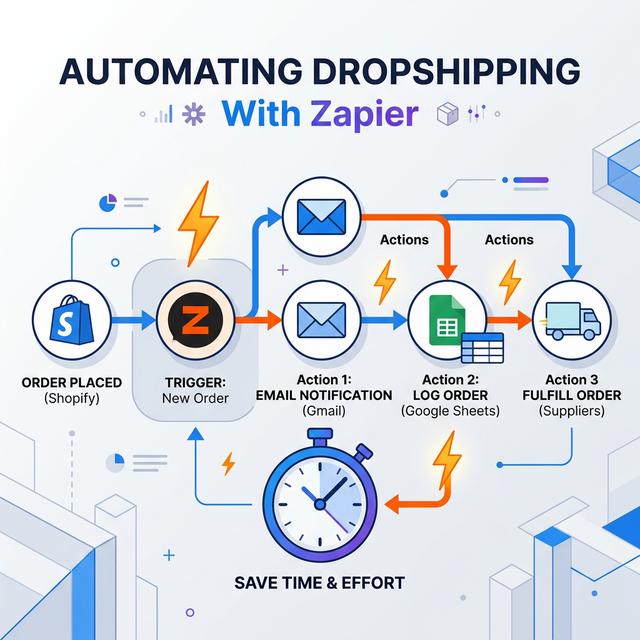
Zapier connects apps that don’t natively communicate using simple if-this-then-that rules:
- Trigger: A new Shopify order comes in
- Action: Zapier creates a matching order in CJ Dropshipping
- Action: Zapier sends a Slack notification to your team
Zapier doesn’t make strategic decisions. It moves data between defined fields perfectly every time. Consistency at scale is the real benefit.
The 5 Automations Every Store Needs First
Start with high-frequency, zero-judgment tasks.
- New order notification (Slack/Email). Send order details to where you actually check messages. This saves 30+ daily dashboard checks.
- Order details to supplier. Auto-create orders in CJ Dropshipping, Spocket, or Zendrop when Shopify processes payment. This reclaims 1-2 hours daily. Make sure you’ve found reliable suppliers that integrate properly.
- Order confirmation email to customer. Custom emails with estimated delivery dates reduce “where’s my order?” inquiries by 40-60%.
- Tracking number update. When your supplier marks the order “shipped,” pull the tracking number and email it to the customer automatically.
- Failed order alert. When payment fails or inventory runs out, send an immediate notification to yourself. Catching failures early prevents customer complaints.
Supplier Forwarding: CJ, Spocket, AliExpress
Forwarding orders to suppliers saves the most time.
CJ Dropshipping and Spocket integrate natively with Zapier. Zapier creates a matching order in the supplier account and maps all fields (name, address, SKU). The supplier receives the order instantly.
AliExpress lacks official Zapier integration. Workarounds include using DSers (which connects to Zapier) or exporting orders to Google Sheets via Zapier, then bulk-importing to AliExpress.
If you use multiple suppliers, use Zapier’s filtering logic: “If order contains SKU-123, send to CJ. If order contains SKU-456, send to Spocket.”
Automated Customer Email Sequences
Automated emails reduce support tickets by setting clear expectations.
- Order confirmation (immediate). Include estimated delivery date, processing time, and support contact details.
- Shipping confirmation. Send when the supplier provides tracking. Include the actual tracking number, not just a link.
- Delivery confirmation (optional). When tracking shows “delivered,” send a follow-up asking for a review. Review requests sent right after delivery convert 3-5x better than requests sent weeks later.
The optimal sequence is exactly 3 automated emails. Anything more is spam.
When NOT to Use Zapier
Not every task benefits from automation. Some require human judgment:
- Customer service. Canned responses to complex questions frustrate customers. Automate the workflow, not the conversation.
- Supplier negotiations. Building relationships, requesting faster shipping, or resolving quality issues require personal touch.
- Product research & ad copy. Finding winning products and writing copy requires strategy and creativity.
- Low-frequency tasks. If you process refunds twice a week, don’t spend 2 hours building an automation to save 2 minutes.
Keep automations simple. Complex conditional logic breaks silently when supplier SKUs or business rules change.
Frequently Asked Questions
How much does Zapier cost for dropshipping?
Zapier has a free plan (100 tasks/mo). Paid plans start at $19.99/mo. Most stores processing 20-30 daily orders need the $49/mo plan (2,000 tasks) to handle order forwarding, notifications, and email sequences.
Can Zapier automate AliExpress orders?
AliExpress lacks official Zapier integration. Use DSers or Oberlo (which connect to Zapier) or export orders to Google Sheets via Zapier and bulk-import to AliExpress. CJ Dropshipping and Spocket offer native Zapier integration.
What's the first Zapier automation I should set up?
Start with order notifications to Slack or Email to eliminate dashboard checking. Then add automatic order forwarding to your supplier portal to eliminate manual data entry.
Does Zapier replace the need for a VA?
Zapier handles repetitive data transfer but not human judgment. VAs handle customer service, supplier communication, and problem-solving. Zapier frees up your VA to focus on these higher-value tasks.